

Orientation & benefits
You're wondering whether printing labels in colour yourself is something for your business? Here you'll find answers to frequently asked questions for individuals and businesses who are in an exploratory phase.
Still in doubt?
Talk to Expert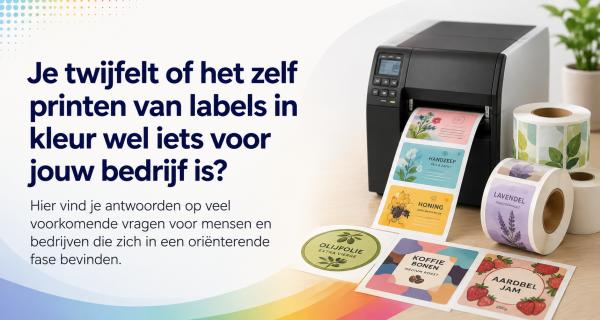
Want to know more or need help?
Maintenance & Supplies
Error Messages & Troubleshooting
Usage & Tips
Installation & Software
Models & Comparison
Costs & ROI
Orientation & benefits
epson colorworks
Which Epson ColorWorks model suits my situation best?
There is no straightforward answer to this question. Where one company can work perfectly well with a CW-C4000, another will settle for nothing less than the CW-C8000 printers. We therefore always recommend getting in touch for advice.
Many customers ask for our advice before, for example, buying an Epson ColorWorks CW-C6000, and during the consultation we regularly end up recommending a different model.
Are the printed labels water- and UV-resistant?
Yes, with pigment ink and the right label material, the labels are resistant to water, sunlight, and many chemical influences. Suitable for GHS and industrial applications.
How fast does an Epson ColorWorks printer print?
Depending on the model, up to 300 mm per second. For small print runs, on-demand printing is extremely fast and efficient.
What do I need to get started with printing color labels?
An Epson ColorWorks printer, suitable label rolls, and the right ink cartridges. Optionally supplemented with label software such as NiceLabel or a graphic design program such as Adobe suite or Affinity Designer. Installation is straightforward.
Is printing labels in color yourself suitable for my business?
In almost all cases the answer is Yes, especially if your business regularly needs small print runs of labels, needs to print variable data, or frequently uses changing designs. Printing in-house is ideal for businesses that want to produce their labels on demand — you are flexible and not dependent on a print supplier. This prevents waste (no large stocks of pre-printed labels that may become outdated). For businesses with very occasional label needs, outsourcing may still make sense, but in many cases the rule is: the more you want to customize your own labels and keep production in-house, the more worthwhile a color label printer becomes for your business.
Printing labels in color yourself can in many cases be easily and efficiently integrated into your business processes. We are happy to look at how we can best implement this within your organization.
Are Epson ColorWorks color label printers environmentally friendly?
Yes, Epson ColorWorks printers contribute to a lower environmental impact through:
- Minimal waste: print exactly what is needed, without excess stock.
- Less waste: no printing plates or clichés required as with traditional printing techniques.
- Low energy consumption: printers are efficiently designed for low energy use.
- Recyclable supplies: Epson offers options for recycling cartridges and maintenance boxes.
What types of labels can I print myself with Epson ColorWorks printers?
- Product labels with full-colour images and text
- Shipping labels with logo and colour coding
- Durable industrial and chemical labels (GHS-certified)
- Barcode and serial number labels
- Food labels including allergen information
- Price labels and promotional stickers
- Labels for healthcare and medical applications
- Variable data labels (best-before date, batches)
From what print runs is it worthwhile to print labels yourself?
Printing labels yourself is especially attractive for smaller and medium-sized print runs, for example between 100 and 20,000 units per batch. The smaller the print run, the more cost-effective in-house printing usually is.
At large volumes (for example >20,000 of the same labels), outsourcing can be more cost-efficient. However, even at large volumes, flexibility and the ability to print variable data can be decisive reasons to print in-house. Much depends on the material used, label format, and the number of different designs being printed.
Are color labels more durable than black-and-white labels?
Yes, especially when pigment ink is used (Epson CW-C series):
- Water-resistant: color remains intact upon contact with water.
- UV-resistant: prolonged exposure to sunlight has minimal impact on quality.
- Wear- and scratch-resistant: better suited to withstand physical stress during logistical processes.
- Chemically resistant: suitable for industrial applications, including chemical labels (GHS standard).
Is using Epson ColorWorks printers difficult or does it require a lot of technical knowledge?
No, Epson ColorWorks printers are designed for ease of use:
- Easy installation: clear steps in manuals and online instructional videos.
- User-friendly software: compatible with widely used software such as NiceLabel and BarTender.
- Minimal maintenance: simple tasks such as replacing cartridges and replacing the maintenance box.
- Extensive support: phone support, knowledge base, and demonstration options.
What advantages do inkjet color label printers offer compared to thermal or laser printers?
- Full color prints: professional appearance, suitable for branding and marketing.
- Durability: Epson pigment inks are water-, UV- and chemical-resistant (C-series).
- Flexible format: easily switch between various roll formats without waste.
- Suitable for labels on roll: higher speed and ease of use than label sheets (laser printers).
- Variable data: ideal for unique barcodes, serial numbers and personalized labels.
Who are Epson ColorWorks color label printers intended for, and what are typical applications?
Epson ColorWorks label printers are suitable for businesses that want to print professional full-colour labels in-house. Typical industries and applications include:
- Food & Beverage: product labels, expiry date labels, personalised labels.
- Logistics & E-commerce: shipping labels with logos or colour coding.
- Chemical Industry: durable GHS labels that comply with regulations.
- Manufacturing & Industry: flexible labelling of changing products and batches.
- Retail & Events: promotional labels, price tags, event tickets.
Why should I print my own labels in color instead of having them printed?
Printing your own labels offers many advantages, especially when flexibility and speed are important. With your own color label printer:
- You print exactly what you need, precisely when you need it (no unnecessary stock).
- You can easily adjust variable data such as barcodes, batch numbers, or dates per print run.
- You are independent of delivery times from external print shops.
- Smaller print runs are more cost-effective compared to offset or digital printing.
- You have full control over design and quality.
When is outsourcing better? For very large quantities (20,000+ identical labels), outsourcing may be more economical.
Ready to find the perfect labels?
Join over 12,000 businesses who trust us for expert advice and high-quality products